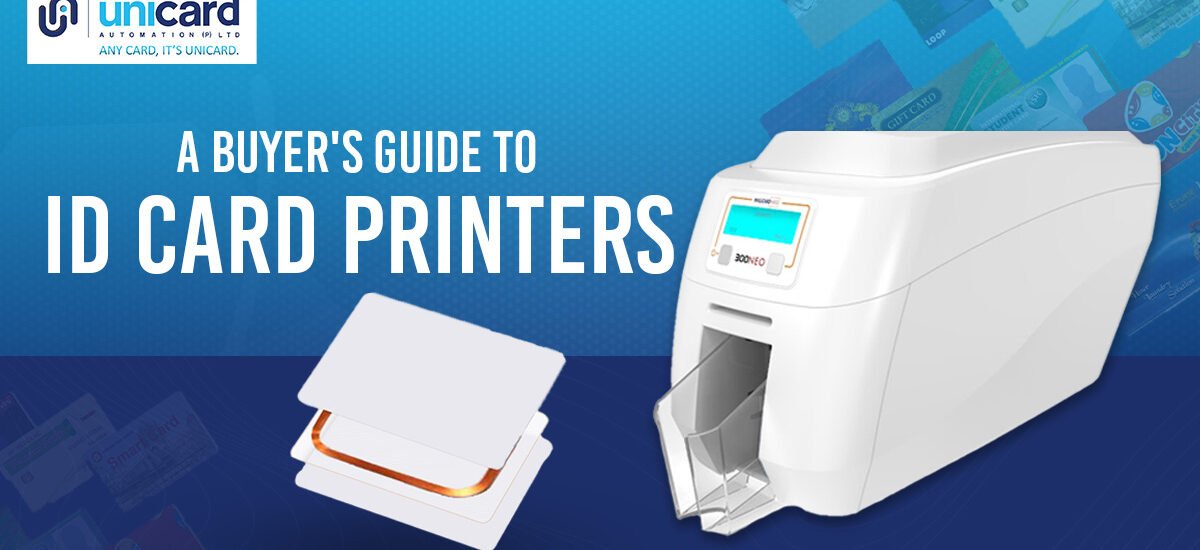
In-house ID card printing is no longer just for large corporations. From small businesses enhancing security to schools managing student IDs, having the right ID card printer on-site offers control, convenience, and a professional image. An ID card is often the first thing that represents your brand, so getting it right is crucial.
But with so many options on the market, choosing the right ID card printer can feel overwhelming. This guide will walk you through the key considerations to help you find the perfect match for your business needs, ensuring you invest in a solution that’s both effective and efficient.
Key Considerations Before You Buy
Before you start comparing models, take a moment to think about your specific requirements. Answering these questions will narrow down your options and make the selection process much smoother.
How Many Cards Will You Print?
Your printing volume is one of the most important factors.
- Low Volume (Under 500 cards/year): An entry-level, hand-fed printer is likely sufficient. These are perfect for small offices or organizations that only need to issue a few cards at a time.
- Mid-Volume (500–3,000 cards/year): Look for a printer with an input hopper to handle batches of cards. These models offer a good balance of speed and affordability.
- High Volume (Over 3,000 cards/year): For large-scale operations like universities or big companies, you’ll need a robust, high-capacity printer designed for continuous, heavy-duty use.
What Type of Cards Do You Need?
Consider the information your cards will hold.
- Basic ID Cards: If you just need a photo, name, and logo, a standard PVC card printer will work well.
- Smart Cards: If you need to store data for access control, payments, or time tracking, you’ll require a printer with encoding capabilities for magnetic stripes, proximity cards (prox), or smart chips.
What Level of Security is Required?
Security is a major reason for issuing ID cards. Printers offer various features to protect against forgery.
- Visual Security: Holographic overlays and watermarks make cards difficult to duplicate.
- Data Security: Encoding options add a layer of functional security, ensuring only authorized individuals can use the cards. Lamination can also extend the life of the card and add tamper-evident protection.
Types of ID Card Printers
There are two primary printing technologies to choose from, each with distinct advantages.
Direct-to-Card (DTC) Printers
Direct-to-card printers are the most common and affordable type. They use a thermal printhead to transfer ink directly from a ribbon onto the surface of the card.
- Best for: Standard logos, photos, and text on basic PVC cards.
- Limitation: They leave a tiny, unprinted white border around the edge of the card. This technology can also struggle with the uneven surfaces of smart cards.
Retransfer (Reverse Transfer) Printers
Retransfer printers print the design onto a clear film, which is then thermally bonded to the card. This process produces a higher-quality, more durable image that covers the entire card surface.
- Best for: High-definition, “over-the-edge” printing and printing on cards with uneven surfaces like proximity or smart cards.
- Benefit: The printhead never touches the card, reducing the risk of damage and producing a more vibrant, durable result.
Must-Have Features and Options
Modern ID card printers come with a range of features to enhance functionality.
- Dual-Sided Printing: This allows you to print on both sides of the card in a single pass, saving time and unlocking more space for information like schedules, emergency contacts, or barcodes.
- Encoding: As mentioned, this is essential for smart cards. Options include magnetic stripes, contact smart chips, and contactless (RFID) technology.
- Lamination: Applying a protective overlay increases the card’s durability against wear and tear and adds a layer of security, making them tamper-resistant.
Balancing Your Budget
ID card printer prices can range from a few hundred to several thousand dollars. While it’s tempting to go for the cheapest option, consider the long-term cost of ownership, which includes ribbons, cleaning kits, and blank cards. An entry-level printer might be cheaper upfront, but a more robust model could save you money over time if you have higher volume needs.
Find the Right Fit for Your Future
Choosing the right ID card printer is an important investment. By evaluating your printing volume, card requirements, and security needs, you can select a machine that serves your business effectively for years to come.
As technology evolves, automation is becoming a key trend. Modern printers are being integrated into broader security and HR systems, streamlining the entire onboarding and access management process. Platforms like Unicard Automation are leading the way, allowing businesses to connect their printer with software that automates card issuance, manages user data, and syncs with access control systems. This creates a seamless, efficient workflow that saves time and reduces administrative overhead. Investing in a printer that is compatible with these emerging automation platforms can future-proof your ID card program.